Feeling overwhelmed by your finances? You’re not alone. The constant stress of not knowing where your money is going, juggling bills, and wondering if you’re saving enough can be a heavy burden. In our experience helping people get started with financial planning, we’ve found this feeling often stems from a lack of clarity, not a lack of income.
Many avoid budgeting because it feels intimidating and restrictive. But what if you could filter out that financial noise and gain crystal-clear control with a tool you already know and trust? A simple spreadsheet is one of the most powerful—and free—tools for taking back that control. This isn’t about restriction; it’s about empowerment. It’s about creating a clear plan that lets you achieve your financial goals, one dollar at a time.
This guide provides everything you need: a free, professionally designed Google Sheets budget planner for beginners and a step-by-step walkthrough to make it your own.
Just as a filter removes impurities to provide clean, healthy water, a well-structured budget filters out financial confusion, giving you the clarity needed to make smart, confident money moves.
Why a Spreadsheet is Your Best First Step to Financial Wellness
Before you download another complex budgeting app with subscription fees and data privacy concerns, consider the time-tested power of a simple spreadsheet. From our experience guiding countless beginners, using a familiar tool like Google Sheets or Excel is a highly effective way to build a lasting financial habit.
Ultimate Customization and Control
Unlike rigid budgeting apps that force you into predefined categories, a spreadsheet is infinitely flexible. It’s a blank canvas for your financial life. You can tailor your personal finance spreadsheet template to your exact situation—whether you have freelance income, unique savings goals like a “sinking fund” for a vacation, or a specific debt you want to tackle. Most importantly, you own your data completely. There are no surprise fees, no intrusive ads, and no selling of your personal financial information.
Simplicity and Accessibility
There’s no need to learn a new, complicated piece of software. Most people have a basic understanding of how spreadsheets work, which removes a major psychological barrier to getting started. With free tools like Google Drive or Microsoft OneDrive, your budget is securely accessible from any device—your desktop at home, your phone on the go, or your tablet on the couch.
Gain True “Financial Clarity”
The simple act of manually reviewing your income and expenses is a game-changer. This conscious process, often called “mindful spending,” gives you a powerful, firsthand understanding of your financial habits that some automated apps can obscure. By using a spreadsheet to track spending and saving, you truly see where every dollar is going. This direct engagement makes it easier to identify areas to cut back and to watch your progress toward your goals in real-time, which is a huge motivator.
A Proven Method Trusted by Experts
You’re in good company. Spreadsheets are a foundational tool used by many Certified Financial Planners (CFPs) and financial coaches to start clients on their financial journey. The spreadsheet method is widely recommended by reputable personal finance sources and championed by thriving communities on platforms like the r/personalfinance subreddit on Reddit for its effectiveness, transparency, and simplicity. It’s a trusted, proven method that puts you firmly in the driver’s seat of your finances.
Ready to get started? Download our pre-built personal finance spreadsheet, refined over years of use, and follow along!👉 Annual & Monthly Budget Spreadsheet
Your Free Google Sheets Budget Planner for Beginners
We’ve designed a clean, powerful, and easy-to-use budget template to get you started immediately. This simple monthly budget spreadsheet is the centerpiece of this guide and your first step toward financial control. It automates all the tedious calculations so you can focus on making smart decisions.
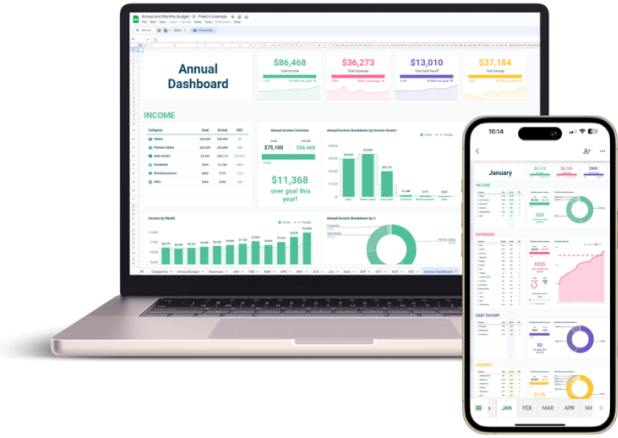
Get Your Free, Simple Monthly Budget Spreadsheet Here
This is the only link you’ll need. Click below to get your very own copy of the budget planner. The link will prompt you to “Make a copy,” which saves the template directly to your private Google Drive account. It is confidential, stored securely within your own Google account, and yours to own and customize.
👉 Click Here to Get Your Free Budget Template
How to Budget Using Your Spreadsheet: A Step-by-Step Guide
This text-based tutorial will guide you through setting up and using your new budget spreadsheet. Open your copy of the template and follow along.
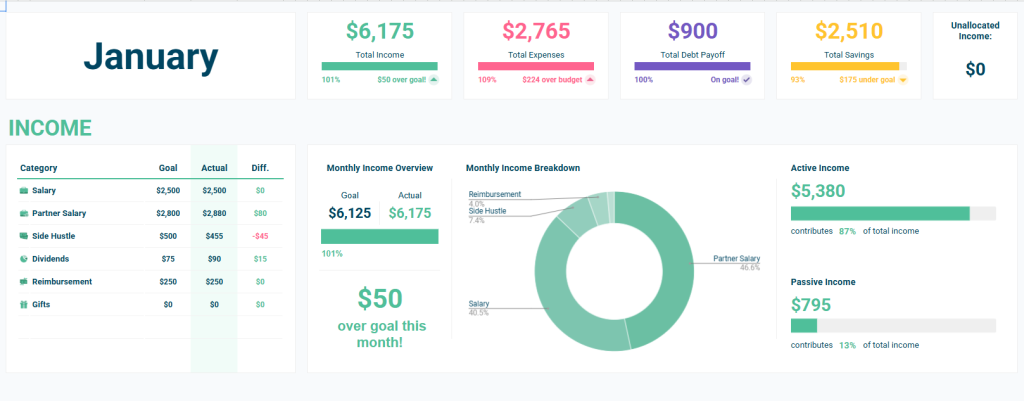
Step 1: Set Your Monthly Income
First, navigate to the “Income” or “Setup” tab. Here, you will enter all your sources of monthly income. This includes your primary salary (the after-tax, take-home amount), any side hustle revenue, and other regular income streams. The spreadsheet automatically totals these figures, giving you a clear number to work with for the month.
Step 2: Customize Your Expense Categories
This is the most important step for making the budget work for you. In the setup area, you’ll find a list of common expense categories. Go through this list and customize it to fit your life. Add, remove, or rename categories like “Groceries,” “Subscriptions,” “Student Loans,” “Pet Food,” or “Fun Money.”
Expert Tip: A common beginner mistake is creating too many categories. Start simple. You can always add more detail later. The more personal and intuitive the categories are, the more likely you are to stick with the budget.
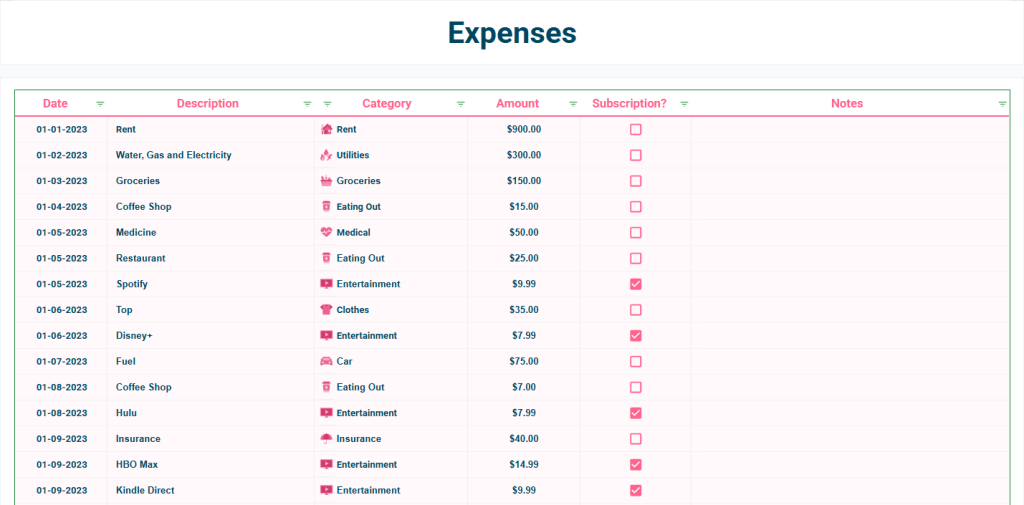
Step 3: Track Every Transaction
Now for the part that builds the habit. Navigate to the “Transactions” or “Expenses” tab. Every time you spend money, log it here. Enter the date, a brief description, the amount, and select the appropriate category from the dropdown menu you just customized.
Pro-Tip from Experience: The key to consistency is to make logging easy. Bookmark the spreadsheet on your computer and save a shortcut to your phone’s home screen using the Google Sheets app. This makes it friction-free to log an expense in seconds, whether you just bought groceries or paid a bill online.
Step 4: Review Your Dashboard for Financial Insights
This is where the magic happens. The “Dashboard” or “Summary” tab automatically pulls all your data and visualizes it for you. You’ll see:
- Your total income vs. total expenses.
- How much you’ve spent in each category.
- Your progress toward your savings goals.
- A clear, visual breakdown of where your money is going.
Crucial Habit: Schedule a 15-minute “money date” with yourself once a week to review this dashboard. This quick check-in is all it takes to see if you’re on track, identify potential overspending before it becomes a problem, and stay motivated by seeing your progress.

This reliable process gives you complete control. Want the spreadsheet that does all this for you?👉 Annual & Monthly Budget Spreadsheet
Advanced Tips: Customize Your Budget for Any Goal
Once you’ve mastered the basics, you can easily adapt your spreadsheet for more specific financial goals.
How to Budget with Irregular or Freelance Income
If your income fluctuates, a traditional monthly budget can feel impossible. Here’s a strategy used by successful freelancers: look at your income from the last 6-12 months and calculate a conservative monthly average. Use this average as your baseline income for your budget. In months where you earn more, sweep the “excess” amount directly into a separate “buffer” savings account, toward high-interest debt, or into investments. This creates stability even when your income isn’t.
Creating “Sinking Funds” for Big Future Expenses
A sinking fund is a savvy wealth-building habit where you save for a large, planned expense over time. Think holidays, a down payment, a vacation, or annual insurance premiums. To do this in your spreadsheet, simply add a new savings goal category named after the fund (e.g., “Vacation Fund”). Then, treat it like a non-negotiable bill, contributing a set amount to it each month.
How to Use the 50/30/20 Rule in Your Spreadsheet
The 50/30/20 rule, a framework popularized by U.S. Senator Elizabeth Warren in her book All Your Worth, is a great guideline for beginners. The goal is to allocate 50% of your take-home pay to Needs, 30% to Wants, and 20% to Savings & Debt Repayment. Our spreadsheet makes this easy to track. After you’ve categorized your expenses, our dashboard’s pie chart provides an instant visual breakdown, helping you see if you need to adjust your spending to hit your 20% savings target.
Ready to customize your own financial plan? Start with our flexible, expert-built template.👉 https://imaplanner.com/sp/finance-spreadsheet
How to Build a Simple Budget from Scratch (A 5-Minute Challenge)
Curious about the mechanics behind our template? Building a basic version yourself is a great way to demystify spreadsheets and appreciate the fundamentals.
Step 1: Set Up Your Tabs and Columns
Open a blank Google Sheet. Rename the first tab “Summary” and the second tab “Transactions”.
- On the Transactions tab, create four columns: Date, Item, Category, and Amount.
- On the Summary tab, create two columns: Category and Total Spent. In the Category column, list your spending categories (e.g., Groceries, Rent, Gas).
Step 2: Use the `SUMIF` Formula for Automatic Tracking
This simple formula is the workhorse of most personal budget spreadsheets. On the “Summary” tab, next to your first category (e.g., “Groceries” in cell A2), you’ll enter the SUMIF formula. It tells the sheet to add up any numbers from your “Transactions” tab that are labeled with that specific category.
The formula looks like this: =SUMIF(Transactions!C:C, A2, Transactions!D:D)
- This tells the spreadsheet to look at the ‘Category’ column on the ‘Transactions’ tab (Transactions!C:C), find any cells that exactly match the text in A2 (“Groceries”), and then add up the corresponding numbers from the ‘Amount’ column (Transactions!D:D).
Or, you can save time and use our expertly designed spreadsheet that has this and more already built for you!👉 Annual & Monthly Budget Spreadsheet
Frequently Asked Questions (FAQ)
Is Google Sheets effective for budgeting?
Yes, it is highly effective and a widely recommended tool by financial professionals for beginners. Google Sheets is free, completely customizable to your personal financial situation, and accessible anywhere. The process of manually engaging with your numbers helps build a strong, lasting awareness of your spending habits that some automated apps can obscure.
What is the best way to track my expenses?
The best method is the one you will consistently stick with. For most people, this means making the process as simple as possible. We recommend using the Google Sheets mobile app to log expenses immediately. This takes less than 30 seconds. All you need are four key details: the date, the item, the category, and the amount.
How do I use the 50/30/20 rule in a spreadsheet?
After tracking a full month of spending, assign each of your expense categories to one of three groups: “Needs,” “Wants,” or “Savings/Debt.” Our template has a section to help with this. The summary dashboard and charts will then automatically calculate the percentage of your total income that went to each group, instantly showing you how your spending aligns with the 50/30/20 framework.
Can I use this budget template on my phone?
Absolutely. This is one of its greatest strengths. Once you make a copy of the template to your Google Drive, you can access, view, and edit it anywhere using the free Google Sheets app for iOS or Android. This makes it incredibly convenient to track expenses on the go.
Have more questions? Our template makes finding the answers easy. Download it here.👉 Annual & Monthly Budget Spreadsheet
Conclusion: Your Journey to Financial Control Starts Now
You don’t need fancy software or a finance degree to take control of your money. A simple, well-organized spreadsheet is one of the most powerful and trusted tools for reducing financial stress, building a savings habit, and designing a life where you are in charge of your money.
Remember, budgeting is not about limitation; it’s about intentionality. It’s about creating a clear plan that allows you to spend on what you value while building a more secure future. From our experience, the feeling of control that comes from knowing exactly where your money is going is priceless. Your journey starts with this one simple, powerful step.
Start your journey to financial clarity today with our free, easy-to-use personal finance spreadsheet!👉 Annual & Monthly Budget Spreadsheet
*Disclaimer: The content in this article is for informational and educational purposes only. It is not intended to be a substitute for professional financial advice. Please consult with a qualified financial advisor to discuss your individual situation.*