Table of Contents
Introduction
Embarking on a construction project, whether a new build or a significant renovation, is an exciting, yet often daunting, venture. Our experience supporting various planning endeavors shows it’s also fraught with financial complexities and potential pitfalls. Staying on budget is paramount for project success, yet it’s frequently cited as one of the most challenging aspects of any construction endeavor. The specter of cost overruns, unexpected scope creep, and disorganized finances can swiftly turn a dream project into a financial nightmare. This is precisely where a robust budget spreadsheet template for construction projects becomes an invaluable asset, providing the clarity, control, and foresight essential for navigating the financial landscape successfully.
While generic budget templates abound, the unique demands of construction necessitate a more specialized and detailed approach. Generic tools often lack the granularity needed to manage the multifaceted expenses typical of building projects. For those seeking comprehensive financial management, it’s worth exploring whether solutions like the detailed spreadsheets available at imaplanner.com could offer an enhanced level of control and insight, potentially being adaptable with thoughtful setup for complex personal construction projects. In this comprehensive guide, you’ll learn how to choose, set up, and effectively use a budget spreadsheet template specifically designed to keep your construction project on solid financial footing, drawing on established best practices in project financial management.
Take control of your project finances today. Explore the imaplanner.com Finance Spreadsheet for a deeper level of financial command.
Why Generic Budget Spreadsheets Fall Short for Construction Projects
While any budgeting effort is better than none, generic personal or simple business budget spreadsheets often prove inadequate for the intricate world of construction. Construction budgeting has unique demands, requiring far more than tracking basic income and expenses. While financial resources like NerdWallet emphasize detailed personal budgeting, this need for detail is significantly amplified when managing the complexities of a construction project.
Construction projects involve specific, often highly detailed, cost categories that aren’t typically found in standard templates. Proper financial management in construction requires a granular breakdown:
- Materials: This isn’t just office supplies; it’s a comprehensive list including lumber, concrete, steel, insulation, roofing materials, windows, doors, plumbing fixtures, electrical components, paint, and diverse finishes, each with varying unit costs, supplier terms, and potential for price volatility.
- Labor: Costs here are multifaceted, encompassing skilled tradespeople (carpenters, electricians, plumbers, masons), unskilled labor, and potentially general contractor fees or project manager salaries. Accurate tracking of hours and rates is critical.
- Permits, Licenses, and Inspections: Essential for legal compliance and safety, these costs can vary widely by jurisdiction and project scope. Neglecting these can lead to costly delays and fines.
- Equipment Rentals: From heavy machinery like excavators and cranes to scaffolding and specialized tools, rental costs can accumulate quickly if not managed diligently.
- Subcontractor Bids and Payments: Managing multiple competitive bids, formal contracts, and scheduled payments for specialized work (e.g., HVAC, roofing, foundation, hazardous material abatement) is a core component of construction budgeting.
- Contingency Funds: This is a non-negotiable element. Experienced builders know that unexpected issues, material price fluctuations, or design changes are virtually inevitable in construction. A contingency fund (with industry guidelines often recommending 10-20% of the total budget, though sometimes higher for riskier projects) is essential to absorb these shocks without derailing the project. In our experience, this is an often-underestimated necessity.
Furthermore, construction budgets demand dynamic, real-time tracking. Merely setting a budget at the outset is insufficient; you must meticulously track actual spending against budgeted amounts as costs are incurred and proactively forecast potential overruns. Managing numerous vendor payments, each with different terms and timelines, adds another layer of complexity that generic budget spreadsheet templates may not be equipped to handle as effectively as specialized ones.
Key Features of an Effective Construction Project Budget Spreadsheet Template
To truly empower you to manage your construction finances, your chosen budget spreadsheet template needs specific features tailored to the industry’s demands. Seek out a template that offers the following, which are hallmarks of a professional-grade planning tool:
- Customizable Cost Categories: Every construction project is unique. Your template must allow you to add, remove, or rename line items to perfectly mirror your project’s specific scope, from initial site preparation and demolition to final landscaping and interior finishes. “Customization” is paramount because, for example, a renovation project will have different primary categories than a new build.
- Detailed Expense Tracking: Essential columns should include ‘Item Description’, ‘Unit of Measure’, ‘Quantity’, ‘Unit Cost’, ‘Budgeted Amount’, ‘Actual Amount’, ‘Variance’ (the crucial difference between budgeted and actual), ‘Payment Status’, ‘Payment Date’, ‘Invoice Number’, and ‘Vendor/Supplier’. This level of detail is vital for accurate cost control.
- Income/Funding Sources Section: If your project is funded through loans, investor capital, personal savings, or phased client payments, a dedicated section to track these inflows against planned drawdowns is crucial for managing cash flow.
- Formulas for Automatic Calculations: At a minimum, the template should automatically sum totals for categories and the overall project, calculate variances (both dollar amount and percentage), and show a running total or percentage of budget spent. More advanced templates might include formulas for earned value or percentage of completion calculations. Crucially, it’s good practice to verify the accuracy of pre-built formulas in any template you use.
- Change Order Tracking: Scope changes are a common reality in construction. A dedicated section or system within the template to log, quantify, approve, and track the financial impact of change orders is absolutely crucial for maintaining budget control and transparent communication with stakeholders.
- Vendor/Contractor Information: A centralized space to list contact details, bid amounts, contract references, insurance documentation, and payment terms for each vendor and subcontractor helps keep vital operational information organized and accessible.
- Timeline/Phase Tracking: The ability to align budget items with specific project phases or milestones (e.g., Foundation, Framing, Electrical, Finishes) provides a clearer picture of cash flow needs and allows for spending to be benchmarked against actual project progress.
- Reporting/Summary Views: A dashboard or summary sheet that provides a quick, at-a-glance overview of the project’s financial health—highlighting key performance indicators (KPIs) like total budget vs. actual, overall variance, and contingency usage—is invaluable for timely decision-making and stakeholder updates. “Ease of Use” in accessing and understanding this information is paramount.

Comparing these features to general budget templates, like those found on Microsoft Create for personal budgets, clearly illustrates the specialized needs and increased complexity inherent in construction financial management.
Choosing Your Platform: Excel vs. Google Sheets for Your Construction Budget Spreadsheet Template
Once you understand the necessary features, the next practical step is choosing a platform for your budget spreadsheet template. The two most common and robust choices are Microsoft Excel and Google Sheets.
- “Excel Budget Spreadsheet Template” for Construction: Pros: Excel is an incredibly powerful tool, renowned for its advanced calculation capabilities, sophisticated conditional formatting, pivot tables for data analysis, and ability to manage large, complex datasets. It offers robust offline access, which can be a significant advantage on job sites with limited or unreliable internet connectivity. Given its widespread adoption in the business world, many contractors and stakeholders are already familiar with its interface. Many users specifically search for an Excel budget spreadsheet template*, much like specific formats are sought for personal budgets on platforms like Etsy. Cons:* Real-time collaboration in Excel, while improved with Microsoft 365, can sometimes be clunkier compared to cloud-native options like Google Sheets. Sharing updates might involve sending files back and forth, potentially leading to version control issues if not managed carefully.
- “Google Spreadsheet Budget Template” for Construction: Pros:* Google Sheets excels at real-time, seamless collaboration. Multiple stakeholders (e.g., project manager, client, contractor, designer) can access, edit, and comment on the same document simultaneously from anywhere with an internet connection. Version history is automatically tracked, allowing for easy review of changes. Its cloud-based nature ensures high accessibility across various devices (desktops, tablets, smartphones). Many search for a “free google spreadsheet budget template,” and its collaborative power is well-demonstrated in how shared Google Docs templates are utilized. Cons: While powerful for most spreadsheet tasks, Google Sheets might have certain limitations for extremely complex formulas, intricate macros, or handling exceptionally large datasets compared to the desktop version of Excel. It also fundamentally relies on internet connectivity for its real-time collaborative features and access. It’s also important to consider data security protocols when using any cloud-based service for sensitive financial information.*
When deciding, consider your project’s size and complexity, the number of individuals who need to collaborate on the budget, their technical proficiency, and your site conditions. Both platforms can host highly effective construction budget templates, and the choice often comes down to specific project needs and team preferences. Many search for either an “excel budget spreadsheet template” or a “google spreadsheet budget template” because both are viable options.
Step-by-Step: How to Effectively Use Your Construction Budget Spreadsheet Template
Having a well-designed template is only the first step. Effective utilization requires diligence, accuracy, and a systematic approach. Professionals in project management consistently emphasize process.
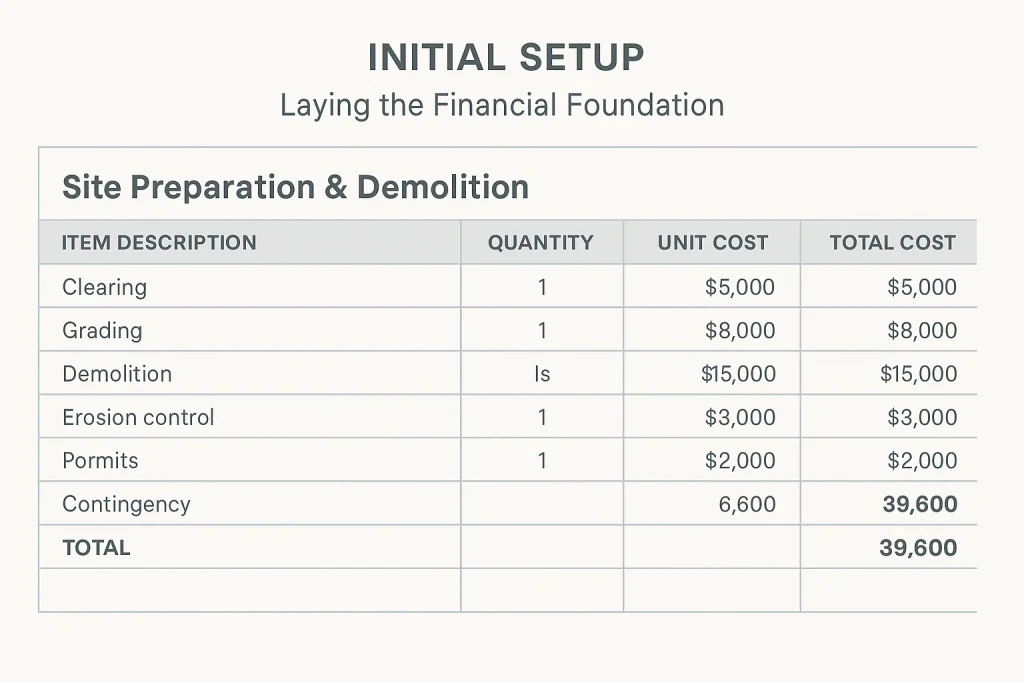
- Step 1: Initial Setup – Laying the Financial Foundation* ### Define Project Scope Exhaustively and Break Down into Logical Phases Before inputting a single number, ensure the entire scope of your construction project is clearly and comprehensively defined. Break this scope down into major phases or stages, such as Site Preparation & Demolition, Foundation & Substructure, Framing, Roofing, Exterior Cladding & Finishes, Electrical Systems, Plumbing Systems, HVAC Installation, Interior Finishes (drywall, paint, flooring), Fixtures & Fittings, Landscaping & External Works, and finally, Project Closeout & Contingency. This detailed work breakdown structure (WBS) will form the backbone of your budget.* ### Populate with Realistic Estimated Costs (The Research Phase) Thorough, diligent research is absolutely key at this stage. For each line item within each phase, input realistic estimated costs. This step isn’t for assumptions; it involves obtaining multiple written quotes from reputable suppliers for materials, detailed bids from qualified contractors and subcontractors for labor, and researching current fees for permits, inspections, and other professional services. The more accurate and well-documented your estimates, the more reliable and useful your budget will be.* ### Allocate an Appropriate Contingency Fund Experienced project managers will attest: virtually no construction project goes exactly as planned. Allocate a robust contingency fund – industry guidelines often suggest 10-20% of the total estimated project cost. This percentage might need to be higher for complex renovation projects with many unknowns (e.g., hidden issues in older structures) or lower for simpler, well-defined new builds with fixed-price contracts. This fund isn’t just ‘extra money’; it’s a calculated financial buffer against the inherent uncertainties and risks of construction, essential for covering unforeseen expenses, material price escalations, or minor client-approved design changes without derailing the entire budget.
- Step 2: Diligent Tracking – Keeping Your Finger on the Financial Pulse* ### Regularly and Promptly Update Actual Expenses This is non-negotiable for maintaining budget control. Successful project managers treat this as a daily or, at minimum, a weekly discipline. As invoices arrive and payments are made, enter the actual expenses into your budget spreadsheet template immediately. Don’t let receipts and invoices pile up; delays in data entry obscure your true financial position.* ### Categorize Expenses Accurately and Consistently Ensure each expense is allocated to the correct budget line item as defined in your initial setup. Mis-categorization can seriously skew your understanding of where money is being spent, mask potential overruns in specific areas, and lead to incorrect financial analysis and decision-making.* ### Track Income, Funding Draws, and Commitments If your project involves external funding, client payments based on milestones, or loan draws, log these inflows accurately and in a timely manner to understand your available capital versus committed and actual expenditures. This is crucial for cash flow management.* ### Document Everything Meticulously For each expense, make detailed notes: invoice numbers, payment dates, check numbers or transaction IDs, and consider linking or keeping organized digital copies of receipts, invoices, and proofs of payment. In our experience, thorough documentation creates an indispensable audit trail and can be invaluable in resolving any discrepancies or disputes with vendors or contractors.
- Step 3: Monitor, Analyze, and Adjust – Staying Agile and Proactive* ### Regularly Compare Budgeted vs. Actual Spending (Variance Analysis) Your budget spreadsheet template should have columns that automatically calculate the variance (difference and percentage) between budgeted and actual costs for each line item and category. Review these variances diligently – weekly is ideal for active projects, bi-weekly at a minimum. Actively look for patterns and trends, not just isolated figures. Consider setting project-specific thresholds (for example, any variance over 5% or a certain monetary value like $1,000) that trigger an immediate investigation.
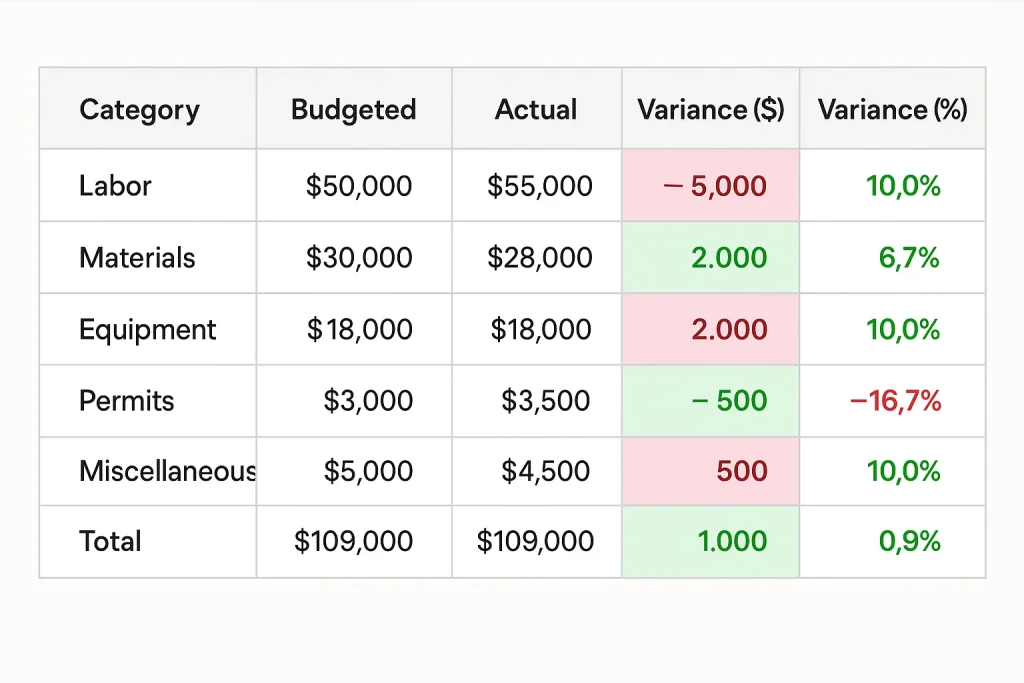
### Identify and Investigate Discrepancies Promptly and Thoroughly If you observe significant variances, especially overspending, investigate the root causes immediately. Was it an unexpected rise in material costs? Did a particular labor task take significantly longer than estimated? Was there an error in the initial estimate? Understanding the ‘why’ behind the variance is crucial for effective corrective action.* ### Implement Data-Driven Corrective Actions Strategically Once you identify a problem and its cause, take decisive, data-driven action. This might involve renegotiating terms with a supplier, sourcing an alternative (but still suitable) material, optimizing a work process to save on labor hours, reallocating funds from an underspent category (with careful consideration), or, in some cases, discussing a scope adjustment with the client (if applicable and documented via change order). The objective is always to bring spending back in line with the approved budget or to make informed decisions about budget adjustments.* ### Manage Change Orders Systematically and Transparently When changes to the original project scope are necessary or requested, it is imperative to document them through a formal change order process. This includes detailing the scope change, its cost implications (both positive and negative), and obtaining formal approval (e.g., client signature) before work commences. Crucially, the budget spreadsheet template must be updated immediately to reflect the approved cost and scope implications of the change. Undocumented changes are a primary cause of budget overruns and disputes.
- Step 4: Reporting and Communication – Keeping All Stakeholders Informed* ### Generate Regular, Clear Financial Reports Use your spreadsheet to create concise summary reports of the project’s financial health. Tailor these reports to your audience: clients may want a high-level overview of total spent versus total budget and progress, while your internal team or contractor might need more detailed breakdowns by phase or cost category.* ### Communicate Clearly, Consistently, and Transparently with Clients, Contractors, and Team Members Share relevant budget information with all key stakeholders in a timely and understandable manner. Transparency builds trust, manages expectations, and ensures everyone is aware of the financial status and any potential issues. The principle of clear communication about finances, often discussed in general budgeting communities (such as online forums where beginners learn personal finance), is equally critical for complex construction projects. Proactive communication about potential financial challenges is always preferable to surprises.
Pro Tips from Experienced Project Managers for Successful Construction Project Budgeting
Beyond the fundamental steps, here are some pro tips, learned from years in the field, to maximize the effectiveness of your construction budget spreadsheet template:
- Start Early & Be Meticulously Thorough: The more detail and research you put into your initial budget, breaking down costs to the smallest practical and controllable level, the better your financial control will be throughout the project. Don’t rush this foundational phase; it prevents costly rework of the budget and planning later on.
- Get Multiple, Detailed Quotes (and Vet Suppliers): For significant material purchases or subcontractor work, always aim to get at least three comprehensive, written quotes. This not only ensures competitive pricing but can also reveal potential discrepancies in scope understanding among bidders. Beyond price, assess supplier/contractor reliability, references, and experience.
- Review and Reconcile Budget to Actuals Diligently: Make reviewing and updating your construction budget spreadsheet a non-negotiable, fixed habit—ideally weekly for active projects, but at least bi-weekly. Consistency is key to catching deviations early and avoiding costly surprises down the line.
- Factor in ALL Potential Costs – Even the Small Ones: It’s easy to overlook or underestimate smaller expenses. Remember to include line items for often-forgotten costs like delivery fees, waste disposal and recycling charges, temporary utilities (water, power), site security, specialized insurance riders, cleaning services, and professional fees (e.g., surveyors, structural engineers). Referencing comprehensive construction industry checklists can help ensure you don’t miss critical categories, much like how personal finance worksheets (such as those available from sources like Consumer.gov) aim for comprehensive coverage in their respective domains. A common oversight, for example, might be the cost of temporary site fencing or portable toilets.
- Collaborate Effectively and Define Responsibilities: If you’re working with a team, client, or multiple contractors, ensure everyone understands their role in providing accurate and timely information for budget tracking. Establish clear communication channels and define who is responsible for approving expenses and updating the spreadsheet.
- Understand Core Budgeting and Financial Principles: Ultimately, a spreadsheet is an effective tool, but its power is maximized by your understanding of financial discipline, cash flow management, and the ability to make informed decisions based on the data it provides. For very large or complex projects, if budgeting feels overwhelming, consider consulting with a quantity surveyor or a financial advisor specializing in construction projects.
Elevate Your Financial Management: Beyond Basic Templates for Personal Builds
Basic budget spreadsheet templates, whether in Excel or Google Sheets, are excellent starting points and can be highly effective for many construction projects, especially smaller, less complex ones. They provide essential structure and a means to track finances diligently when used correctly.
However, for individuals managing more complex personal construction projects, such as a custom home build, a large-scale historic renovation, or for small business owners overseeing significant building work where project finances might intertwine with personal or broader business finances, a more robust and feature-rich solution might offer significant advantages.
Introducing the imaplanner.com Personal Finance Spreadsheet (Adaptable for Detailed Project Tracking):While presented as a tool for comprehensive personal finance management, the features often associated with the imaplanner.com Personal Finance Spreadsheet—such as detailed tracking, versatile categorization, and insightful reporting—could potentially be adapted for managing the intricate finances of significant personal construction projects. Its strengths, when applied in this context, might lie in:
- In-depth Granular Tracking: The tool is described as being built for detail, suggesting it could allow you to meticulously monitor every single expense, payment, and income source related to your build, which can be particularly helpful when personal funds are heavily involved.
- Connecting Project Costs to Broader Financial Goals: It is suggested that the spreadsheet can help align project spending with these broader objectives and track progress against them if the construction is part of a larger personal financial goal (e.g., building an investment property for future income, or a dream home that represents a major life investment).
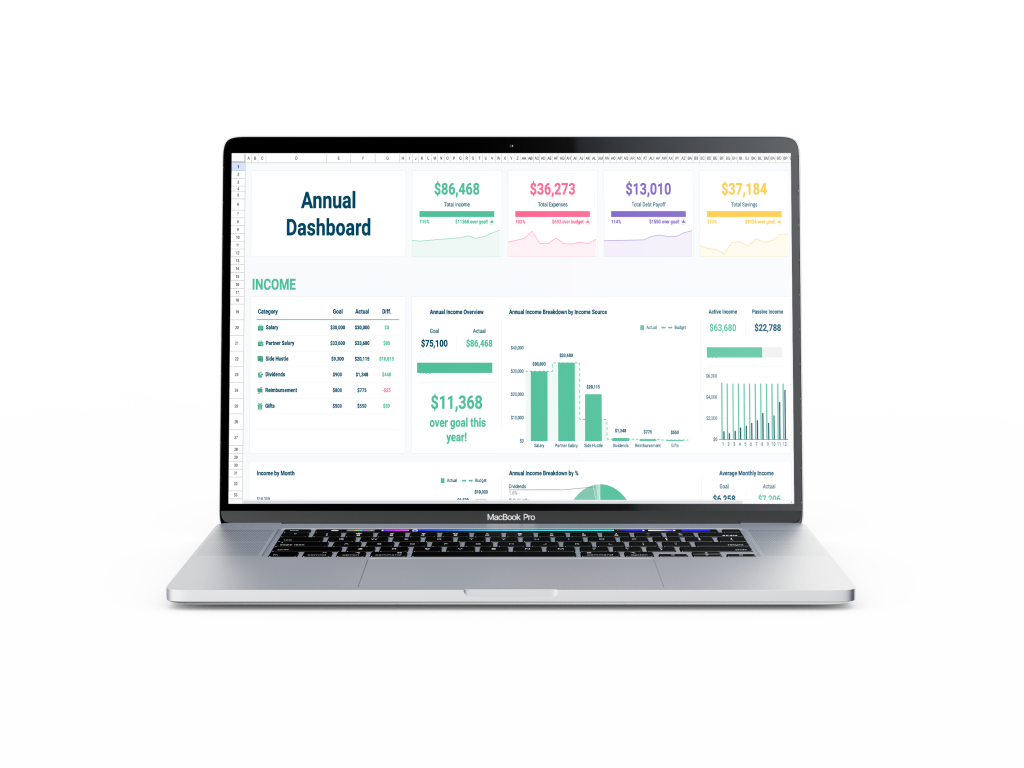
- Enhanced Visualization Tools: Its dashboards and charts, often highlighted for financial clarity, might offer a more intuitive and immediate picture of your project’s financial status, cash flow patterns, and spending breakdowns compared to standard spreadsheet views, making complex data easier to digest.
This can be particularly useful if the construction project is for your personal residence, where project costs directly impact your overall household budget and net worth, or for a small business owner where streamlined, comprehensive financial oversight across all ventures is paramount. The imaplanner.com solution is presented as a unified platform aiming to help manage these interconnected financial aspects with a high degree of precision. While not a dedicated construction ERP, its adaptability could offer a sophisticated step up from basic templates for the right user and project type.
Call to Action: Ready to take your project (and potentially personal) financial planning to the next level with a tool designed for detailed oversight? Check out the imaplanner.com Finance Spreadsheet for a comprehensive solution
FAQ: Construction Budget Spreadsheet Templates
- Q1: What essential items, based on industry best practices, must be included in a construction budget spreadsheet template?* Answer: Key categories include detailed material breakdowns, labor (often broken down by trade for clarity), permits and fees, subcontractor bids/actuals, equipment rentals, and a vital, non-negotiable contingency fund (with industry guidelines often suggesting 10-20%). Essential data columns are ‘Item Description,’ ‘Budgeted Cost,’ ‘Actual Cost,’ ‘Variance’ (the difference, both in value and percentage), ‘Payment Status,’ ‘Payment Dates,’ and ‘Vendor/Supplier Information.’
- Q2: How do I create a simple construction budget spreadsheet template in Excel or Google Sheets if I need something basic? Answer: Start by listing all major cost categories specific to your construction project in rows (e.g., Site Work, Foundation, Framing). Then, create columns for ‘Item/Task Description,’ ‘Estimated/Budgeted Cost,’ ‘Actual Cost,’ ‘Variance,’ ‘Date Paid,’ ‘Invoice #,’ and ‘Notes.’ Use SUM formulas at the bottom of cost columns to get totals for each category and an overall project total. Many online tutorials showing, for example, how to create generic Excel budgets (such as the one found at `https://www.youtube.com/watch?v=ZbOVEE96ZcY`), can teach you basic formula setup; you then adapt these principles by populating the template with construction-specific line items. Remember, “simple” is relative; even basic construction budgets require significant detail to be useful.*
- Q3: Can I find a free budget spreadsheet template suitable for small construction projects? Answer: Yes, many free budget spreadsheet template options for general budgeting can be adapted* for small, straightforward construction projects. Search for “free Excel budget template” or “free Google Sheets budget template.” You will then need to customize these extensively by adding construction-specific categories and columns. Sources like Microsoft Create or even Canva offer general free templates that can serve as a very basic starting point, but expect to invest time in their modification for construction purposes.
- Q4: How much contingency should I realistically include in my construction budget?* Answer: A common professional recommendation is to include a contingency fund of 10-20% of the total estimated project cost. However, this is a guideline, not a strict rule. For very complex projects, renovations in old buildings (where unforeseen conditions are common), or if you are less experienced in construction management, aiming for the higher end of this range (or even slightly more, like 25%) is prudent risk management. Simpler, well-defined new builds with experienced teams might budget closer to 10-15%. It’s less about a fixed number and more about a realistic assessment of project risk.
Conclusion
A well-structured and diligently maintained budget spreadsheet template is far more than just a document; it’s a cornerstone of successful construction project management and a critical tool for financial stewardship. It transforms potential financial chaos into clarity and actionable insight, empowering you with robust cost control, facilitating more informed and timely decision-making, ensuring transparency with all stakeholders, and significantly reducing the financial stress often associated with construction.
However, it’s vital to remember that a template, no matter how sophisticated, is only a tool. Its true power is unleashed through consistent, accurate updating, regular critical analysis of the data it presents, and proactive, decisive adjustments based on that analysis. By implementing the strategies and best practices outlined in this guide, you can take firm, confident control of your construction project’s finances.
For those looking to integrate their detailed project budgeting with a more comprehensive financial overview, particularly for significant personal builds or small business endeavors where funds may be co-mingled or closely related, consider exploring advanced, adaptable solutions.Take control of your project finances today. Explore the imaplanner.com Finance Spreadsheet for a deeper level of financial command..